building brainbust
Over the last few months, I've been building a camera-based monitoring system for the espresso machine in Braintrust's San Francisco office. The motivation was somewhat silly, but also serious: Braintrust has a beautiful La Marzocco Linea Micra, and like any shared kitchen appliance, its longevity depends on people doing a few small things correctly like wiping down the steam wand and dumping the portafilter after use. Despite dozens of friendly reminders, infractions occurred almost daily.
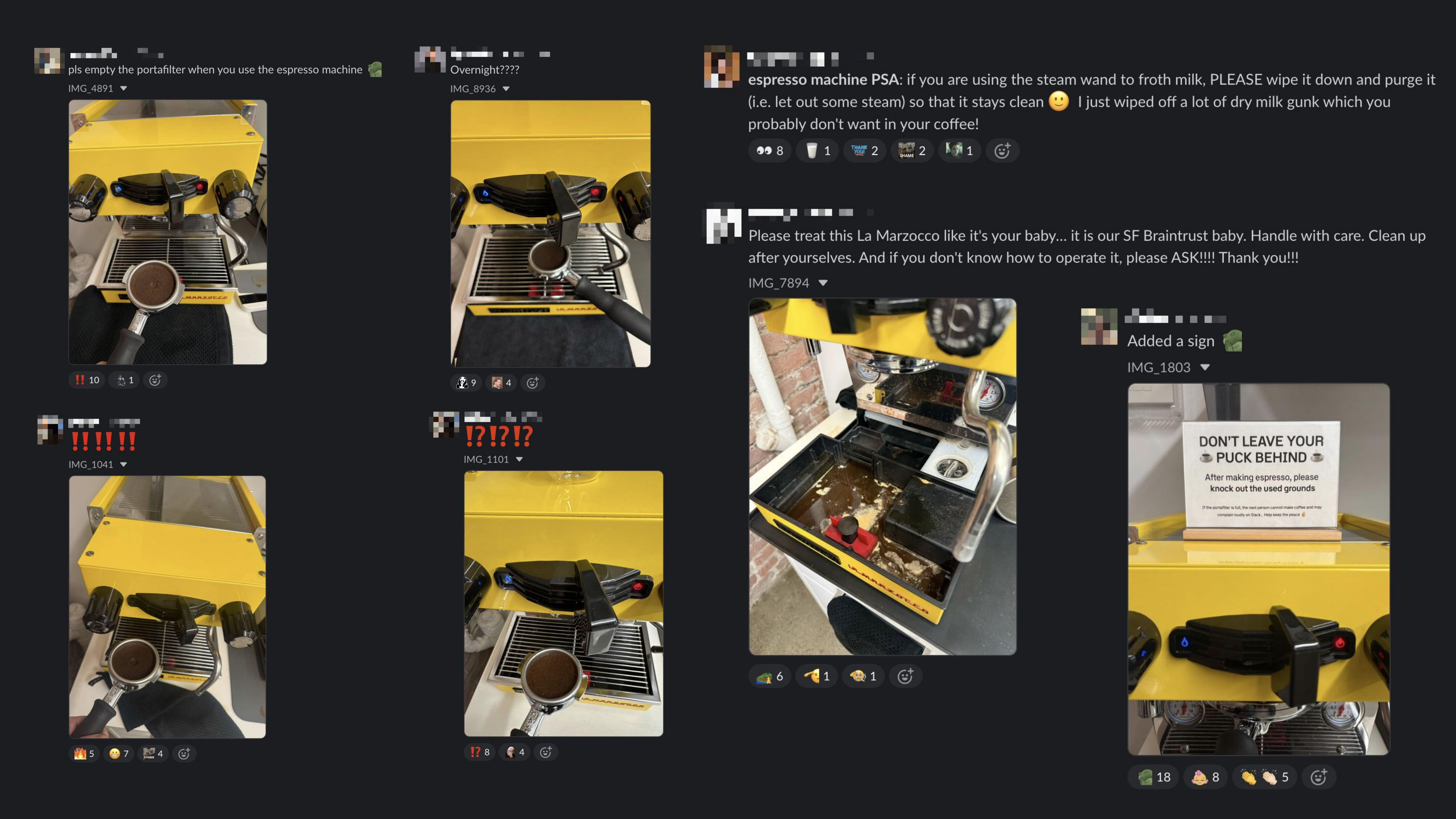
I figured this would be a great excuse to build a fun hardware project.
How it works
At a high level, Brainbust is a local session recorder plus an automatic VLM reviewer. The Raspberry Pi decides whether something worth reviewing happened; the cloud stores the evidence; when a session closes, the system makes a VLM call to produce a structured answer about what happened.
The system has five main components:
- Edge capture: A Raspberry Pi 5 and USB camera watch the espresso machine area.
- Session detection: A Python agent turns sustained machine-area activity into a bounded coffee-making session.
- Persistence: Supabase stores preview stills, session videos, device health, and review state.
- VLM review: when a session closes, the Next.js app creates a signed video URL and submits it to a Qwen-based reviewer running on Baseten.
- Evals: Braintrust traces the model calls, stores the golden dataset, and compares prompt/model changes.
The important constraint is that Brainbust does not stream every frame to a model. The Pi reads frames in real time, checks whether a person is occupying the machine zone, opens a session only after sustained activity, and saves the useful window as a low-FPS clip. Once that clip is in Supabase, the automatic review path is one VLM request against the saved evidence instead of a continuous vision stream.
Hardware setup
Unlike the system I built last Halloween to detect
and classify trick-or-treaters through my doorbell feed, there was no existing camera to hook into
here. I bought an
Arducam (12 MP),
stuck it on the top of the coffee machine, and hooked it up to the Raspberry Pi. I imaged the Pi
with Raspberry Pi Imager, enabled SSH, and configured Wi-Fi. Once the Pi was reachable and camera
connected via USB, I checked that the camera appeared under /dev/video0 and /dev/video1 and
verified a still capture with ffmpeg:
ffmpeg -f v4l2 -input_format mjpeg -video_size 1920x1080 \
  -i /dev/video0 -frames:v 1 -y test.jpg
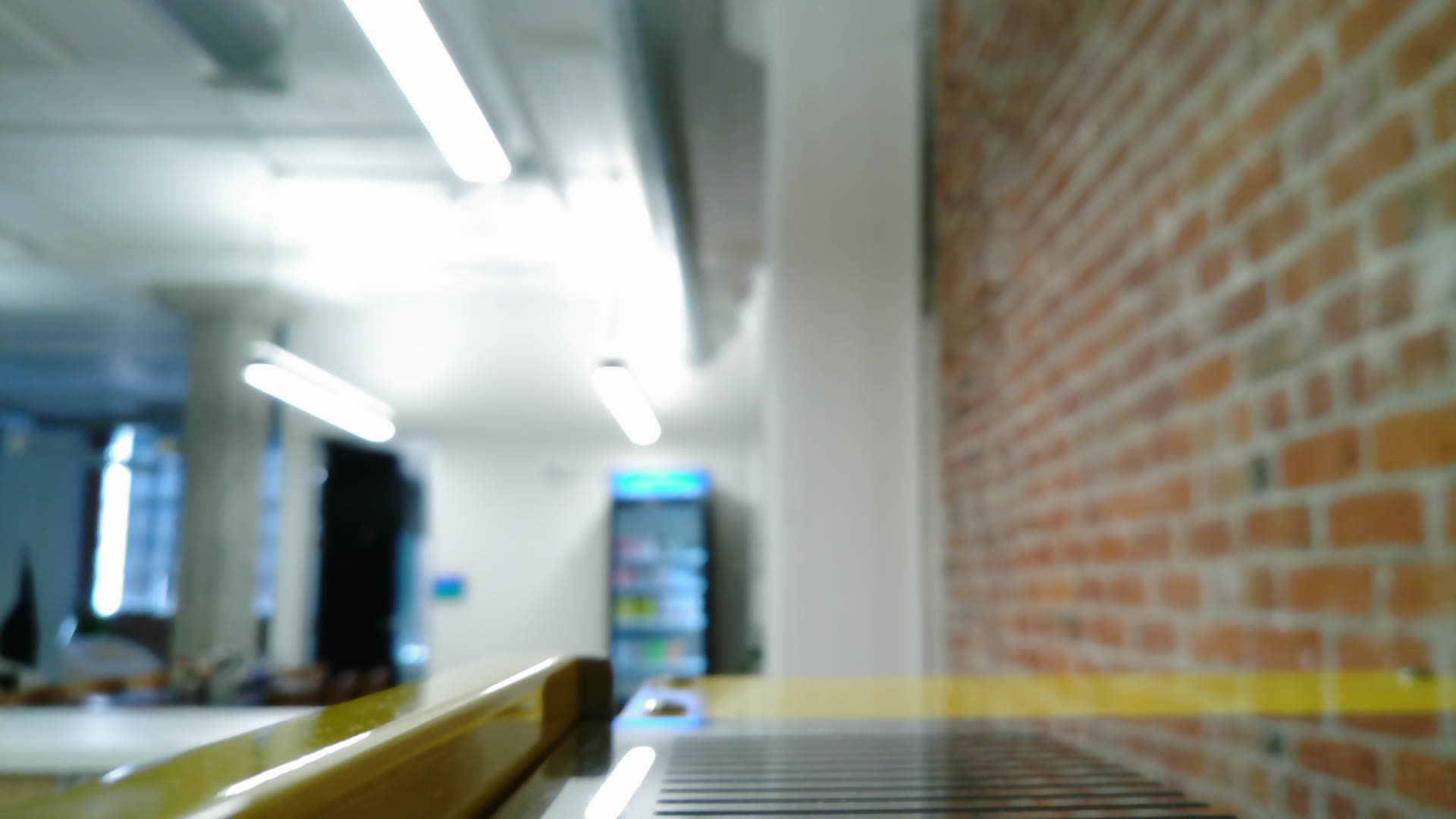
The first successful image was a blurry, backlit office scene, largely dominated by the top of the espresso machine. Importantly, it had no line of sight to the activity zone. To capture both the activity zone and a recognizable view of the user, I ended up mounting the camera several feet above the machine and angling it downward.
Here is the final physical setup, followed by the view from the camera once I rotated the frame into the orientation I used while tuning the detector.
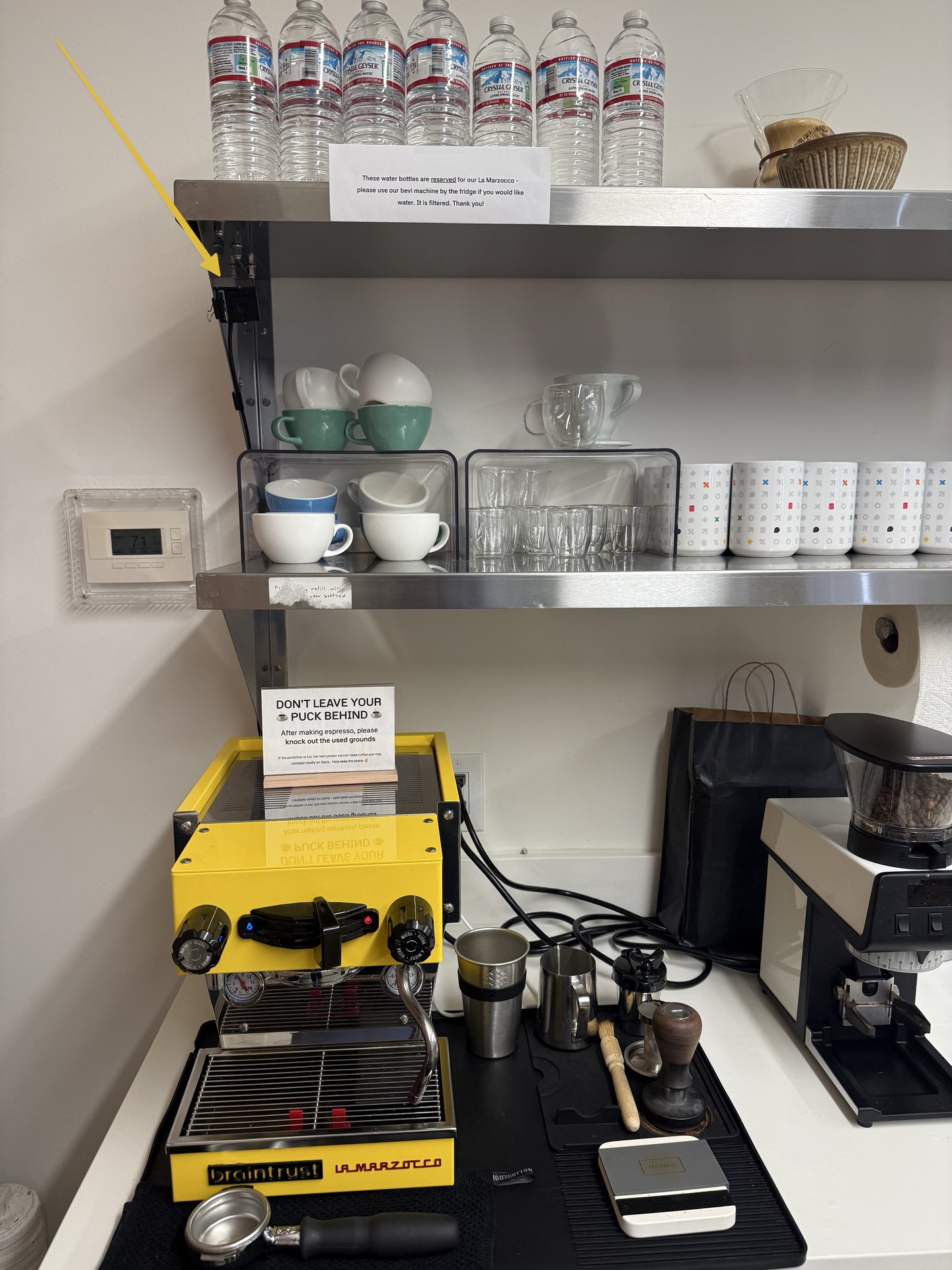
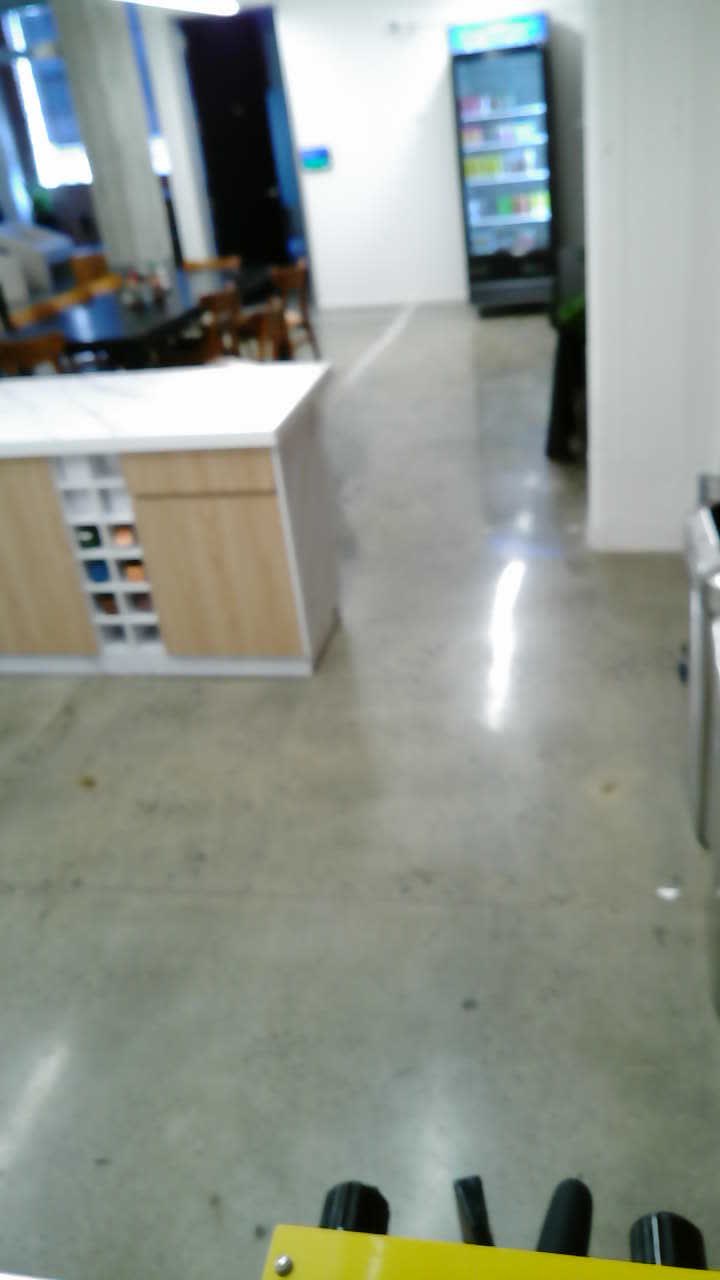
It wasn't perfect, but it was enough to continue on.
Session capture
The next step was getting the system to detect people making coffee. Given the viewport I ended up with, using motion alone would be too noisy: employees needed to be able to walk past the machine, stand nearby talking, and walk around the kitchen without triggering the system. I decided to use a YOLO model with a very specific region of interest that took a lot of trial and error.
I modeled the flow as a small state machine:
idle: no one is at the machinepresent_candidate: someone appears, but not long enough to count as a sessionactive_session: the person has been present long enough that this is probably coffee makingabsent_grace: the person left, but the session stays open briefly in case they come back
I used duration thresholds to decide when to move between states. If someone is present for less
than 30 seconds, the system stays in present_candidate and discards the detection. If present for
more than 30 seconds, it becomes an active_session.
The absent_grace state handles the messy middle: someone might step away while the shot is
pulling, then come back to remove the portafilter. Instead of splitting that into multiple clips,
the system keeps the session open briefly if the interruption is under the threshold.
I knew I would need the raw footage to be able to accurately evaluate the system, so I added low-FPS MP4 recording for each session, with a small frame buffer so the first few seconds of a candidate session are not lost while the dwell threshold is being confirmed.
Data storage
Everything is stored in Supabase:
coffee_captures: preview stills and capture metadatacoffee_sessions: session status, video paths, and VLM review resultscoffee_device_status: heartbeat, camera health, system stats, and warning state- private Storage buckets for stills and session videos
The Pi authenticates to a narrow ingestion API with a device token. The web app keeps the Supabase service-role key server-side, mints short-lived signed upload tokens for the still and video buckets, and writes the capture/session/device-health metadata into Postgres. The browser also never sees bucket credentials; it gets server-created signed URLs when it needs to display private images or videos.
I also added device health reporting to give me a more complete picture of the system. The Pi reports heartbeat time, last frame read time, upload status, camera read failures, CPU temperature, memory usage, disk space, uptime, loop latency, and network reachability. This ended up being very useful since the system was sitting out in the kitchen, where someone could accidentally unplug the Pi, bump the camera, move the machine area, or knock the network offline.
VLM review
Now for the fun part. Each session video gets sent to a VLM to spot infractions. The VLM reviewer runs on Baseten with Qwen2.5-VL. The first version reviewed the raw session video directly. The web app created a signed URL for the private MP4, sent it to the Baseten Qwen reviewer, and expected one JSON object back with the full review:
{
  "visible_espresso_machine": true,
  "operator_at_machine": true,
  "is_making_coffee": true,
  "removed_portafilter": true,
  "used_milk_frother": false,
  "cleaned_milk_frother": null,
  "confidence": 0.91,
  "evidence_times_sec": [4, 32, 47],
  "scene_description": "Coffee workflow observed; portafilter removed",
  "notes": "Operator removes the portafilter before leaving."
}
But the first version was far from perfect. The model sometimes confused nearby activity with machine use, missed small portafilter movements, or gave inconsistent answers on steam-wand use. To help debug, I traced everything to Braintrust: model output, parsed JSON, metadata, and review result. When a review was wrong, I could inspect the trace and add the clip to a dataset. This golden dataset now has 20 human-labeled clips, with positive and negative examples for coffee-making, portafilter removal, and steam-wand use.
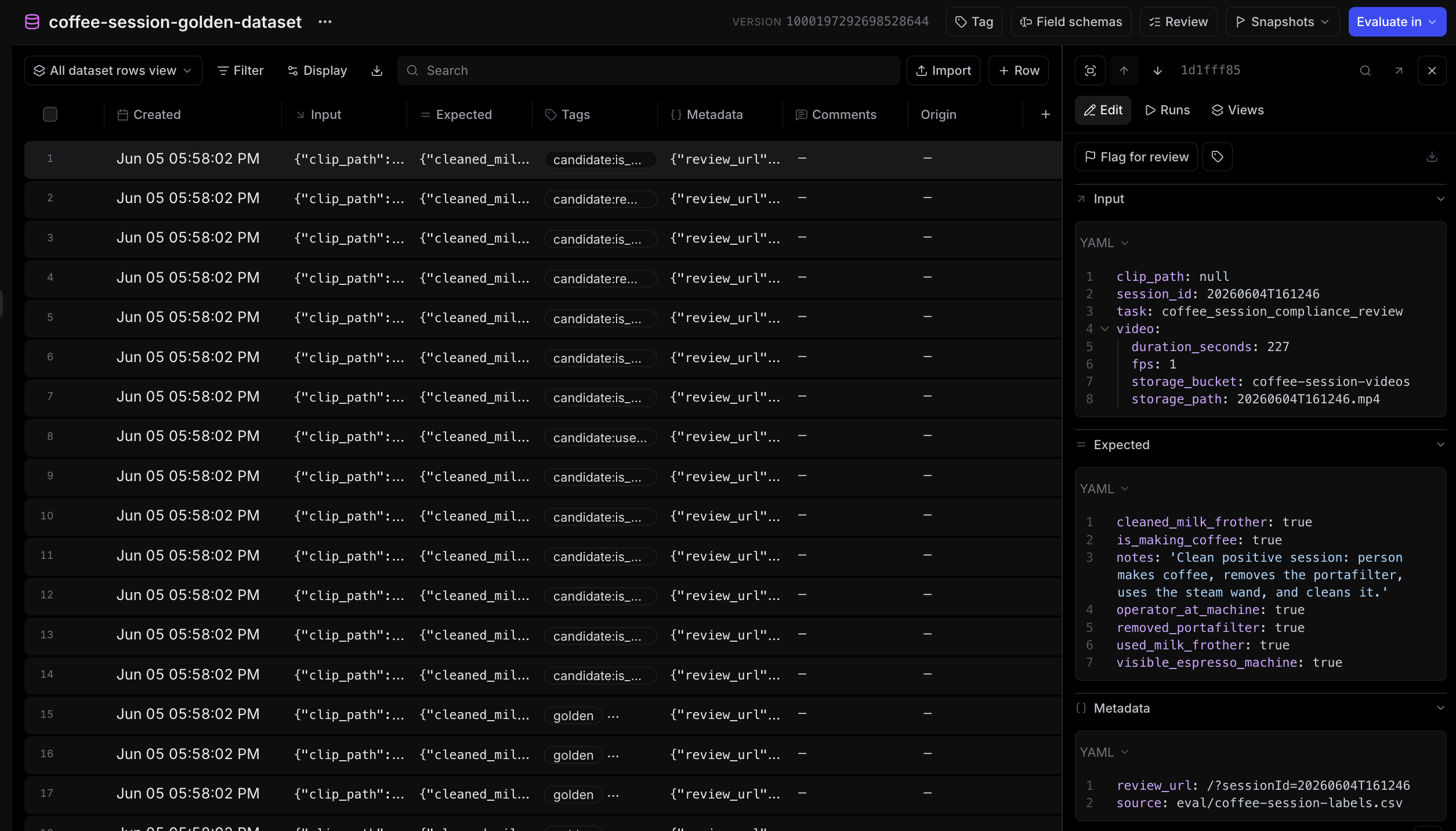
With telemetry and an eval harness in place, I made four major adjustments:
First, a specific prompt. Due to the weird angle and poor camera quality, I found that the prompt needed to describe the setup, the portafilter shape, common false positives, and the difference between portafilter activity and steam-wand activity. The production prompt is long, but the important parts look like this:
Use contact-sheet sequences to inspect small late actions such as portafilter carrying, dumping, knocking, or object changes at the bottom edge of the yellow machine.

Set removed_portafilter=true when the operator grabs the dark handle, twists/pulls it out, carries a black handle-like object away/downward/off-frame, knocks/dumps a handled metal object in a side bin or sink, or when the handle is clearly gone from the locked machine position after the last hand movement. Do not infer removal merely because a hand covers the lower edge, because a person walks away with a drink cup, or because the handle area is temporarily occluded.

Steam-wand use looks like one hand holding a pitcher/cup up against the lower/side/front edge of the yellow machine for several seconds while the other hand operates or rests on a side knob/paddle/control near that same area. The pitcher can be partly cropped by the far lower or side edge of the frame. Count a rigid round silver/white rim, bowl, or base as a visible vessel when it is held against the machine during the frothing setup, even if only part of the vessel is in frame and the wand is hidden.

Do not invent a pitcher from hands, shadows, a dark portafilter handle, a towel, white clothing/sleeves, skin, or the operator's forearms. If the sequence is only standing, waiting, portafilter handling, phone/drink handling, sleeves/hands near the machine, or touching the machine side with no distinct vessel, set used_milk_frother=false and cleaned_milk_frother=null.
Second, contact sheets. The actions the system needs to detect are tiny and easy to miss. Contact sheets make those small moments easier for the vision model to inspect, especially in long clips where raw video review gets compressed and sampled. The contact sheet gets reviewed by Qwen, but as image input instead of raw video input. The contact sheets include:
- a full-clip overview
- a lower-machine zoom
- an initial lower-machine zoom for steam-wand review
- a final-minute sheet
- a final-minute lower-machine zoom
Each sheet is a 4-column grid sampled across the clip. The lower-machine crops discard the top 40% of the frame so the model spends more attention on the portafilter, steam-wand, pitcher, towel, and hand area.
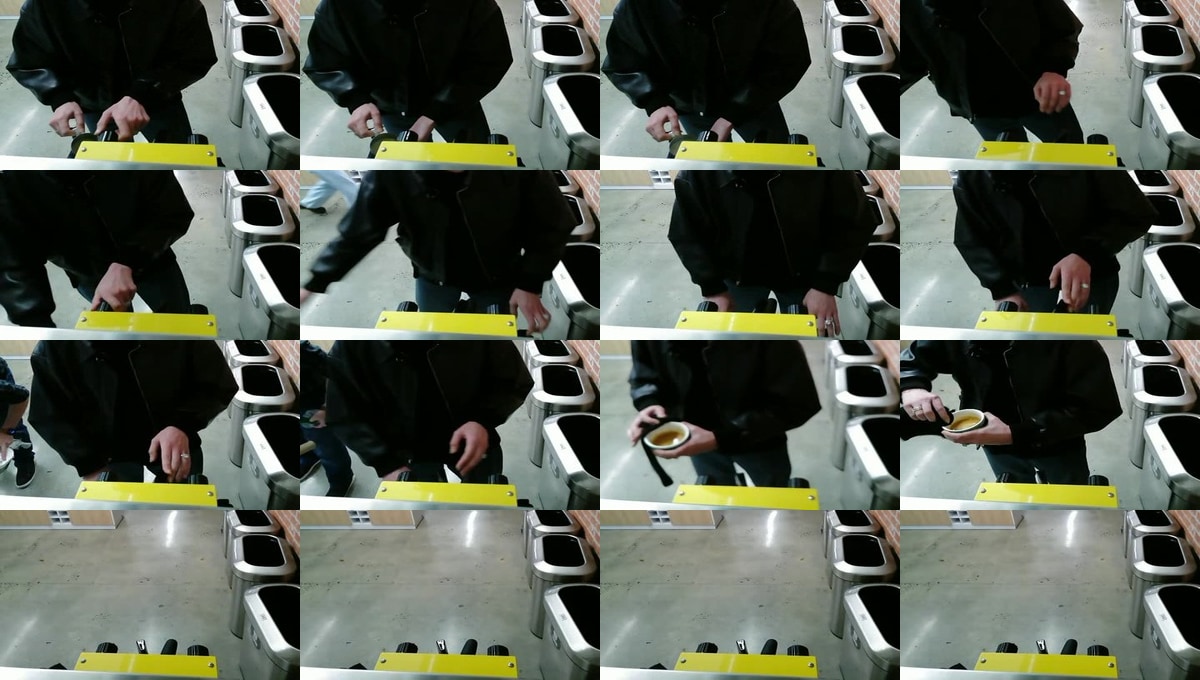
Third, focused second passes. These are additional Qwen calls with narrower prompts. The first pass
answers the broad session question. If needed, a second pass reviews only portafilter removal, and
another reviews steam-wand use and cleaning. The steam-wand pass has a guardrail after parsing: a
true used_milk_frother decision must be supported by both vessel evidence and wand/control
evidence in the model's own notes. That prevents the second pass from turning vague hand motion,
towels, sleeves, or portafilter activity into a false steam-wand hit.
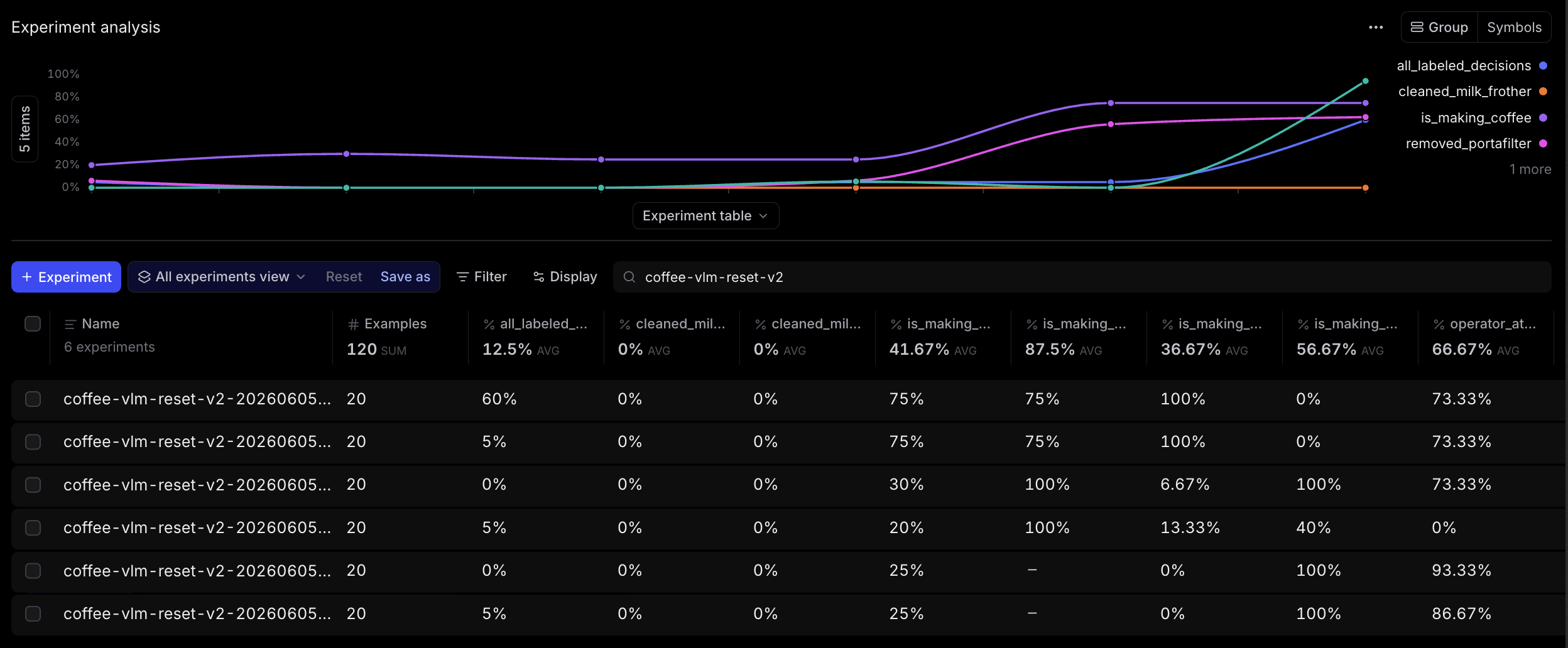
The broader experiment progression looked like this:
Finally, I tried changing out the model. Prompting, contact sheets, and second passes all helped, but I was still frustrated that I couldn't get 100% accuracy across all conditions, so I ran the same 20-row golden dataset against a few alternatives. GPT-5.5 (using contact sheets) was best at detecting coffee making. Gemma was better than the others on portafilter removal. Qwen was strongest on the negative milk-frother cases. But still, none of them solved cleaning the milk frother: the single positive cleaning example still scored 0% across the final comparison.
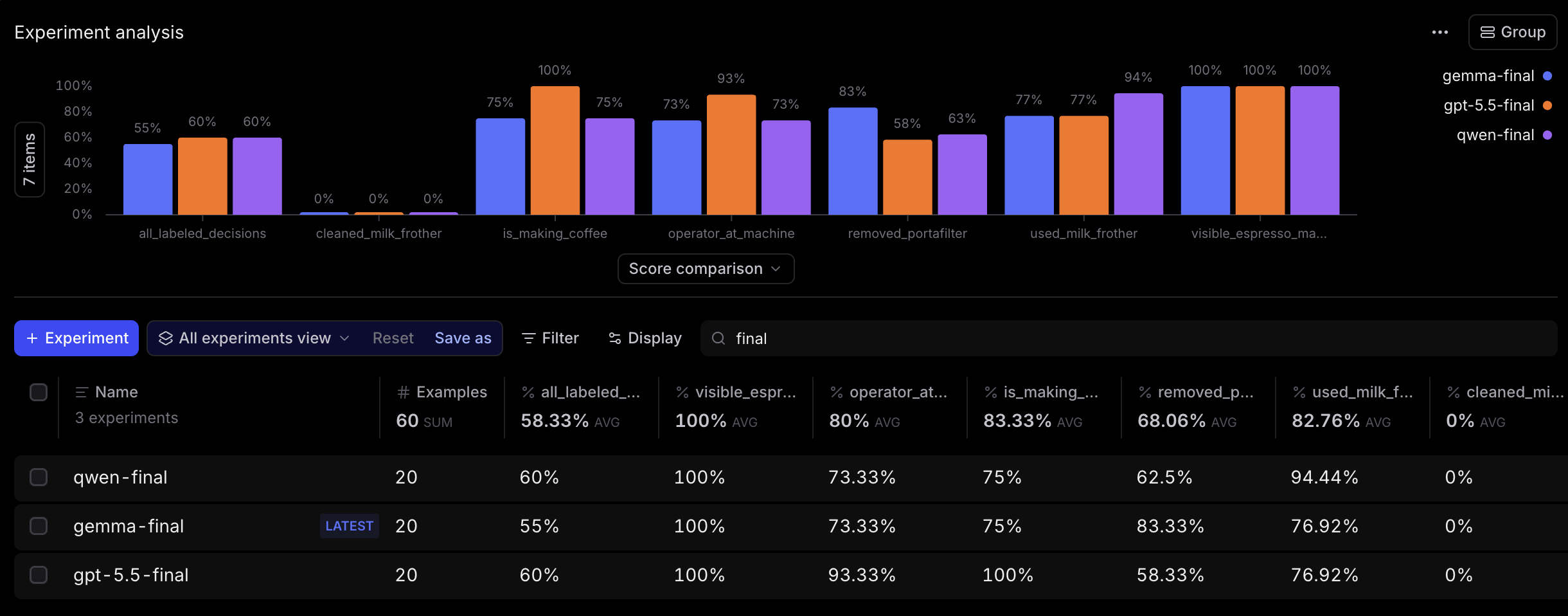
The big lesson here was that the bottleneck was never the model. No amount of prompt engineering or model upgrades could make up for the poor quality of the footage.
Review console
I wanted to make a surveillance-inspired web app to review the footage: dark background, monospace type, green accents, session rows, device health, a selected still, and a review drawer. I used Paper's desktop app and MCP server, which nailed this aesthetic.
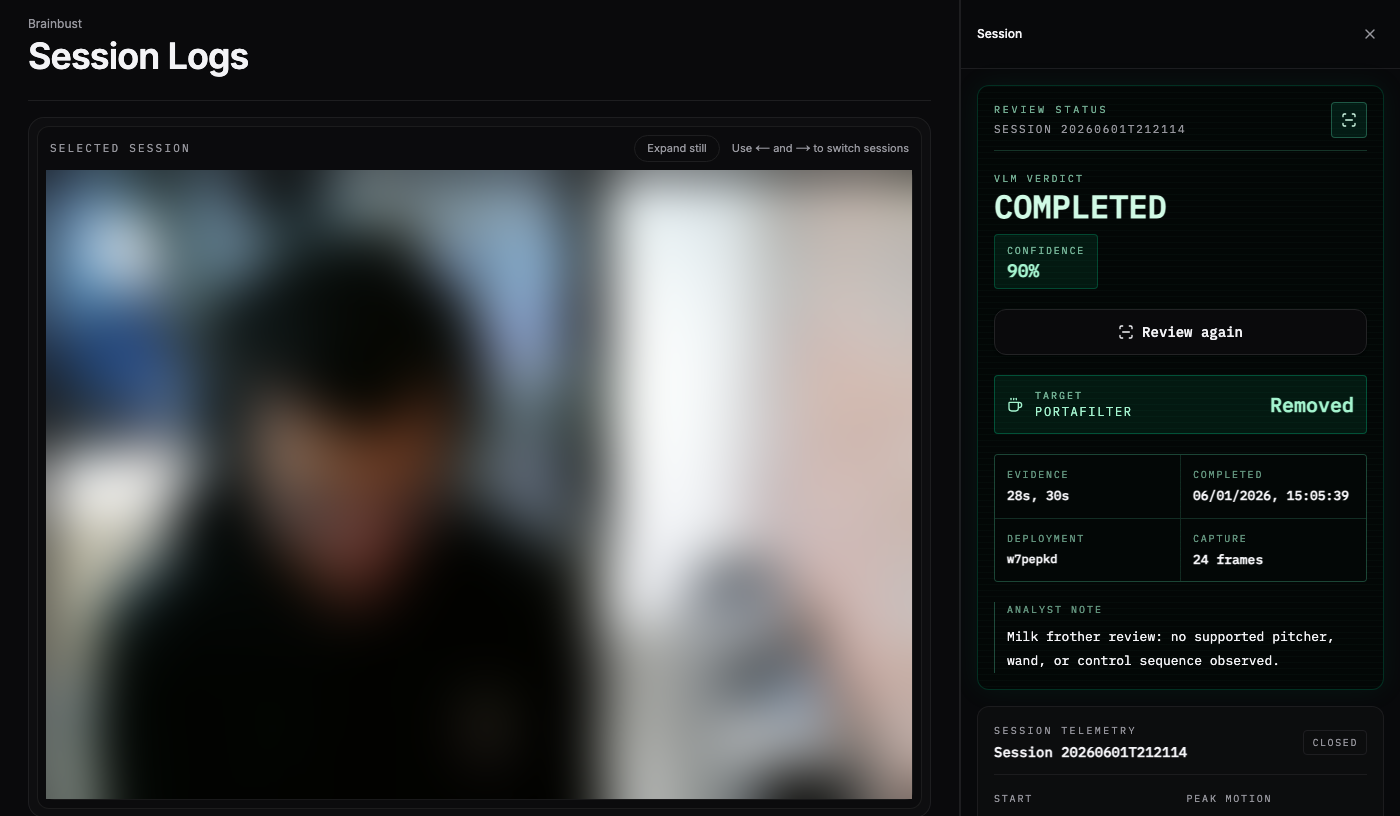
The UI subscribes to Supabase Realtime for capture changes, polls in-flight reviews, and lets me page through older sessions. A completed review has to be glanceable: status, confidence, portafilter decision, steam-wand decision, evidence timestamps, and a short analyst note. Without that, the system is just a pile of private videos with model output attached.
const channel = supabase
  .channel("coffee-captures-feed")
  .on(
    "postgres_changes",
    {
      event: "*",
      schema: "public",
      table: "coffee_captures",
    },
    () => {
      void refresh();
    },
  )
  .subscribe((status) => {
    setRealtimeState(status.toLowerCase());
  });
Learnings
-
The physical world is hard to control. I had a clear picture of the view I wanted: the operator's hands, the portafilter, and the steam wand all in frame. In practice, there was not a great place to put the camera. The angle was a compromise, and that compromise affected everything downstream. The system also depended on basic hardware staying connected. If someone unplugged the Raspberry Pi or the camera, the whole system stopped working.
-
VLMs need structured evidence, but structured evidence is not magic. I expected to send a session video to a VLM and get back a clean answer. That was not enough. The camera angle was awkward, the footage was low quality, and prompt changes alone barely moved the compliance scores. Contact sheets, cropped views, and focused second passes made the review much more useful. Trying different models made the failure mode clearer: the best models still could not reliably infer milk-frother use from this angle. I can label the clip because I know the machine geometry, where the pitcher would be, and what the person is doing with their hands. The model mostly sees a weird top-down blur of arms, towels, cups, and a yellow rectangle.
-
Continuous VLM review is still expensive. Running every session through the model was useful for debugging, but it was not the right long-term setup. In the production data I inspected for this post, the Pi had uploaded 85 session videos across 24 active days: about 3.5 sessions per active day, with a median clip length of 70 seconds and an average of 94 seconds. Fifty-nine of those sessions had completed VLM reviews. Each review was at least one Qwen call, and focused second passes could turn a single coffee session into two or three VLM calls. That is fine for debugging. It is not fine as an always-on tax for a shared appliance. I eventually switched to using Brainbust more as a chronological log, so the Pi uploads stills and videos, the web app keeps the history, and if needed, I can open the session and manually trigger a VLM review. Until VLMs get drastically cheaper (like LLMs have), I expect most consumer products will have to make some sort of compromise here.
Closing thoughts
Brainbust started as a cheeky way to catch people who don't clean up after themselves, but it ended up being one of the more instructive hardware systems I've built. It sits at a fun intersection: edge capture, hardware setup, databases, realtime UI, async inference, model prompting, and the uncooperative physical world.
I won't be publishing the live site or open-sourcing the repo because the underlying footage is private, but I'm happy to talk through the implementation with anyone building similar systems. If you're working on real-world vision, edge inference, or tools for making shared office appliances slightly less chaotic, I'd love to jam.